We’re excited to share that two new deliverables are officially available with iGUIDE.
Site Plans are now available as an add-on to iGUIDE Standard or Premium residential listings. They show how a home sits on the land including buildings, outdoor space and overall layout and can be captured alongside a standard iGUIDE scan with minimal added time or complexity on site. The result is new client-ready deliverables without changing your workflow.
Branded Property Overviews are also now available through the existing agent banner and turn interior floor plans into polished agent-branded collateral ready for sharing or print.
Together, Site Plans and Branded Property Overviews help you expand your offering and grow your business while helping your agent clients stand out.
One thing that I’m not clear about is whether this feature is intended for iGuide operators to set up branding for end users, or whether this is intended for end users (e.g. realtors/our clients) to do that themselves. That help article makes it sound like it’s meant for end users because of statements like "You can customize your Branded Property Overview by heading to your profile settings".
The Branded Property Overview can be created or edited by both iGUIDE Operators and iGUIDE Editors.
Operators can create or edit any branding associated with their account.
Editors (e.g., agents/realtors who have been given Editor permissions to an iGUDIE) can create or edit the branding that lives under their own user account.
Who Can Add Branding to an iGUIDE?
Only the iGUIDE Operator can add or assign branding to an iGUIDE
Editors can update their own branding profiles, but they cannot apply that branding to an actual iGUIDE tour. Assigning branding is an operator‑only capability.
Summary
Editors can: create and edit their own branding.
Operators can: create branding, edit branding, and add/assign branding to any iGUIDE.
Are available for iGUIDE Standard and iGUIDE Premium
Are produced only when a banner is applied to the iGUIDE
If the banner is applied to the standard or premium iGUIDE in question and it is still not working, please let me know and I would be happy to create a support ticket on your behalf to look into this case.
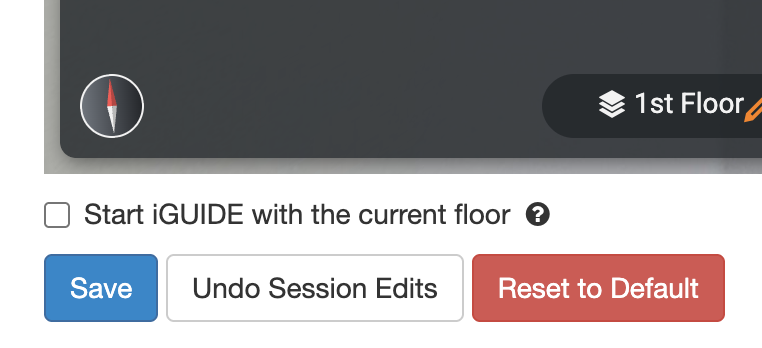
Hi everyone! Thank you for bringing these concerns to us. We have found the issue and a fix has been deployed. If the Branded Property Overview was already generated, the iGUIDE Edit Default View for that specific iGUIDE will need to be saved again to force the changes. The save button is on the bottom left hand side of the screen as shown in the screenshot below.
If you are still experiencing issues, please let the support team know and we will be happy help!

 Branded Property Overviews are now live.